
Overchat AI is a web and mobile app that puts chat models, image tools and video generation behind one subscription. Instead of signing up for each model separately, you pick from a list that includes GPT-6, Claude Opus 5.5, Gemini 3.8, Grok 4.7 and DeepSeek V4 Pro for text, Nano Banana 2, Seedream 5 Pro, GPT Image 2.5 and Qwen Image 2 for pictures, and Seedance 2.5, Kling 3, Veo 3.1, MiniMax H3 and Grok Imagine 1.5 for clips.
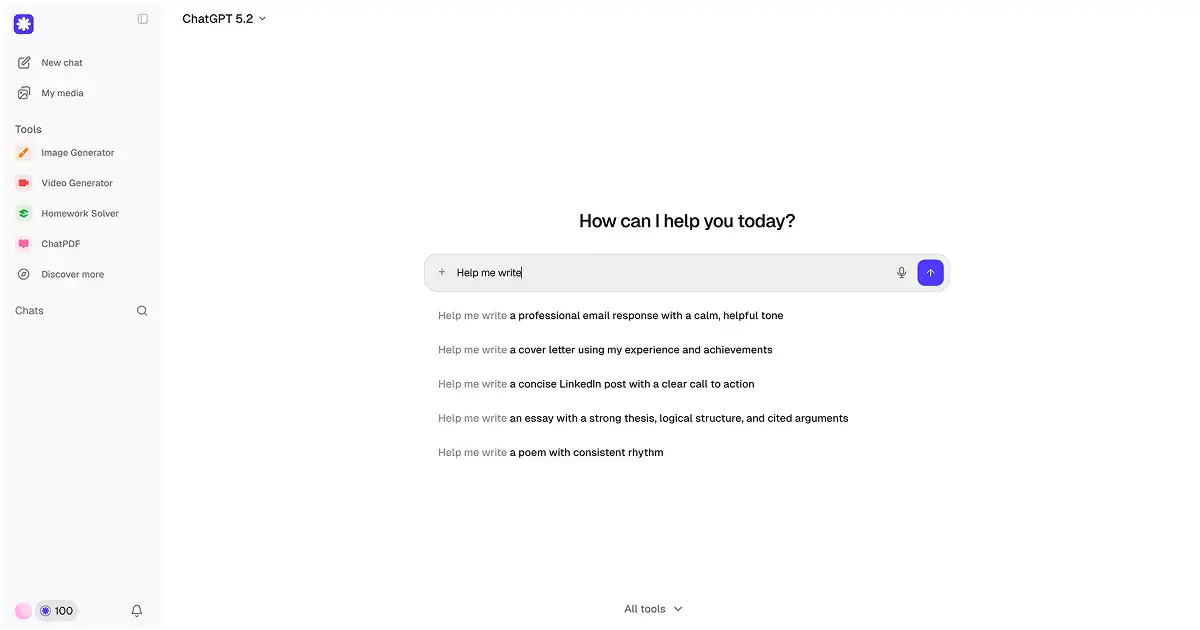
Around those studios sit a catalog of 150+ ready-made tools, a prompt library, a model comparison page and ChatPDF for asking questions about documents. It runs in the browser and as an iOS and Android app; the company says more than 1M creators use it.
 overchat.ai · open full screenshot
- Starts at
- $7.50 / month
- Free plan
- Yes
- Platforms
- web, ios, android
- Category
- AI Chatbot
What Overchat AI does
Several chat models in one window
The chat area lists GPT-6, Claude Opus 5.5, Gemini 3.8, Grok 4.7 and DeepSeek V4 Pro, so you can switch model for a task without leaving the app. A separate page compares 50+ models.
Image studio with editing tools
Beyond text to image and image to image, the studio includes upscaling to 4x, face swap, background removal to transparent PNG, relighting, restyling, erasing objects and rewriting text inside a photo while keeping the original font and layout.
Video studio
You can turn a prompt or a photo into a clip, extend an existing video by seconds, upscale it, swap faces, cut a subject out, lip-sync a photo to audio, join clips and add a dolly push-in shot.
Product photo workflow
Upload one phone photo and the product studio removes the background, places the item in a scene you describe, or returns four angles of the same product from a single upload. The page says a shot renders in about 30 seconds and downloads in HD.
Tool catalog and ChatPDF
The 150+ tools cover writing, humanizing and detecting AI text, paraphrasing, translation into 100+ languages, homework and photo math solving, and summarizers for YouTube videos, web links, paystubs and bank statements. ChatPDF accepts PDFs up to 20 MB and also Word, PowerPoint, Excel, text, code and image files.
Browser and mobile apps
Overchat runs in the browser and as an app for iOS and Android, so the same studios and tools are reachable from a phone.
How to use Overchat AI
- 1Open Overchat in a browser or install the iOS or Android app.
- 2Choose a studio (chat, image, video) or pick a ready-made tool from the catalog.
- 3Type a prompt, or upload a photo or document; for images you can also set the model and aspect ratio.
- 4Press generate and review the result.
- 5Download the output in HD, or change the scene, model or ratio and generate again.
Popular for
Marketplace sellers
Amazon, Shopify and Etsy sellers can turn one phone photo into a white-background hero image plus lifestyle shots, and generate the front, angle, top and detail views a listing needs.
Dropshippers and resellers
Supplier photos that look identical across every store can be regenerated in different scenes and backgrounds so the listing looks distinct.
Writers and students
Drafting essays, emails and posts, rewriting text in your own words, translating it, or working through a homework problem step by step.
Document and video research
Ask questions of a PDF or report, pull key points from a long YouTube video or web page, or check where money went on a bank statement.
Overchat AI pricing
Freemium- There is a free plan at $0 forever with no card required, limited to 1 image a day and 0 videos on Nano Banana.
- The Mini plan is $15 per month, or $7.50 per month when billed yearly at 50% off annual billing, and covers roughly 460 images or 45 videos per month on Nano Banana / Runway Gen-4.
- If you run out of credits you can buy a top-up for more images and videos.
Pros
- One subscription covers chat, image editing and video generation instead of separate tools for each.
- You can pick a specific model per task, such as GPT Image 2.5 for clean text in an image or Veo 3.1 for video with sound.
- The free plan needs no card and lets you test image generation before paying.
- Product photos can start from an ordinary phone picture, with background removal and scene changes done by prompt.
- Works in the browser and on iOS and Android.
Cons
- The free plan allows only 1 image a day and no videos.
- Image and video output is metered by credits, so heavier use means buying top-ups.
- Desktop apps for Windows and macOS and browser extensions for Chrome and Edge are listed as coming soon, not available now.
Overchat AI FAQ
Is Overchat AI free?
Yes. There is a free plan that costs $0 forever and requires no card, but it is limited to 1 image a day and 0 videos.
What is Overchat AI used for?
It is used for chatting with several AI models, generating and editing images, making short videos, and running ready-made tasks such as summarizing a PDF, translating text or solving a math problem from a photo.
Which AI models does Overchat AI include?
The chat list includes GPT-6, Claude Opus 5.5, Gemini 3.8, Grok 4.7 and DeepSeek V4 Pro. Image and video work draws on models such as Nano Banana 2, Seedream 5 Pro, GPT Image 2.5, Seedance 2.5, Kling 3, Veo 3.1 and MiniMax H3.
How much does the Mini plan cost?
Mini is $15 per month, or $7.50 per month if you choose annual billing, which is 50% off. It includes roughly 460 images or 45 videos per month on Nano Banana / Runway Gen-4.
Can I chat with a PDF in Overchat AI?
Yes, through ChatPDF. It accepts PDFs up to 20 MB and can also read Word, PowerPoint, Excel, text, code and image files, so you can ask for a summary, a translation or an explanation of a section.
Does Overchat AI work on a phone?
Yes, there are apps for iOS and Android alongside the web version, so the chat, image and video studios are available on mobile.
Alternatives in AI Chatbot


Written from overchat.aioverchat.ai/pricingoverchat.ai/ai-tools/ai-product-photographyoverchat.ai/docs/chatpdfoverchat.ai/image/ai-image-generator· reviewed by a person · updated Oct 31, 2026